 ar.io Documentation
Join the Network
Take control of the permanent web by running your own ar.io Gateway. Join the decentralized network that powers the permaweb and earn rewards for providing infrastructure services.
Prerequisites
Running Gateway Required
You must have a fully functional ar.io Gateway running with a custom domain and SSL certificates.
Don't have a gateway yet? Follow our Production Setup Guide to get your gateway running with proper DNS configuration.
Requirements:
- Gateway accessible via your custom domain (e.g.,
https://yourdomain.com) - SSL certificates properly configured
- ArNS subdomain resolution working
- Gateway responding to test requests
Minimum Stake Requirement
To join the network as a gateway operator, you need 20,000 ARIO tokens as the minimum stake requirement.
Need to acquire ARIO tokens? Visit our Get the Token guide to learn about all available methods including exchanges, DEXs, and network participation.
Acquisition Options:
- Purchase on centralized exchanges like Gate.io
- Trade on Solana DEXs (Jupiter, Raydium)
- Use a Solana wallet (Phantom, Solflare, Backpack) to manage tokens
- Earn through network participation and community programs
You will also need SOL in your wallet for Solana transaction fees when joining the network.
Join the Network
Choose your preferred method to register your gateway:
Visit the Network Portal
Go to gateways.ar.io to access the ar.io's Network Portal.
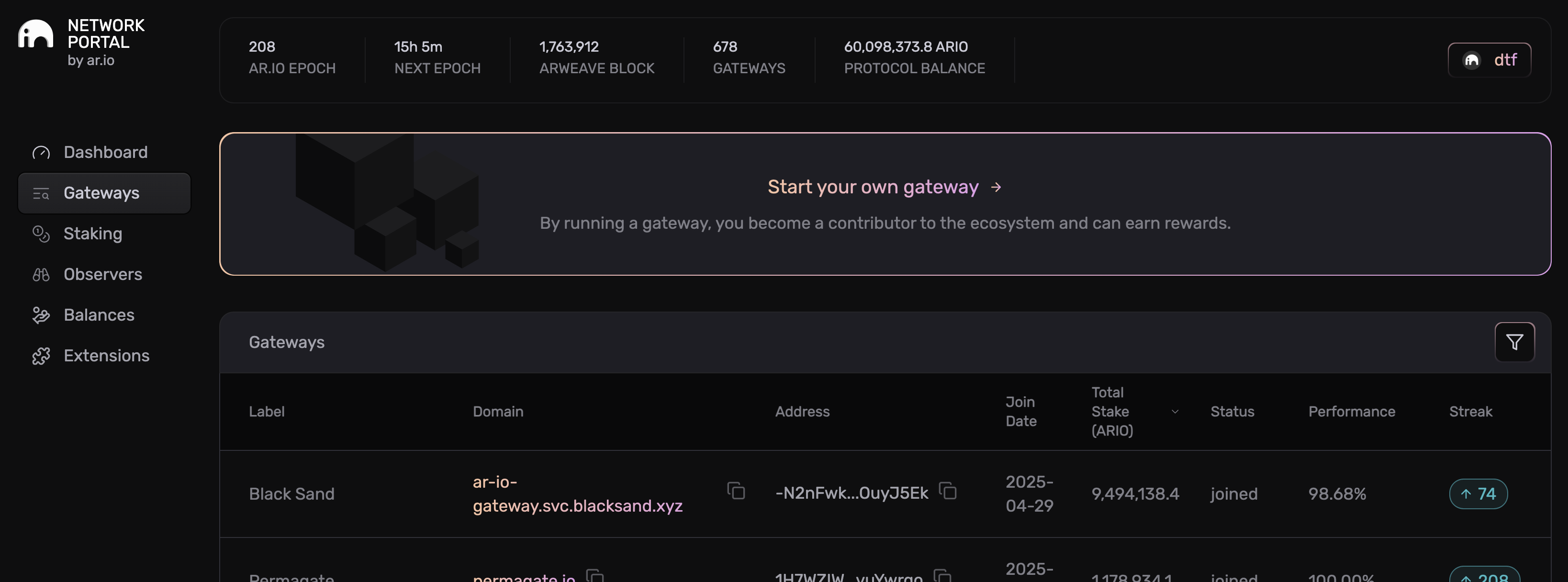
The portal shows all active gateways on the network and provides the interface to register your own gateway.
Connect Your Wallet
Click the "Start your own gateway" button to begin the registration process. You'll be prompted to connect your wallet.
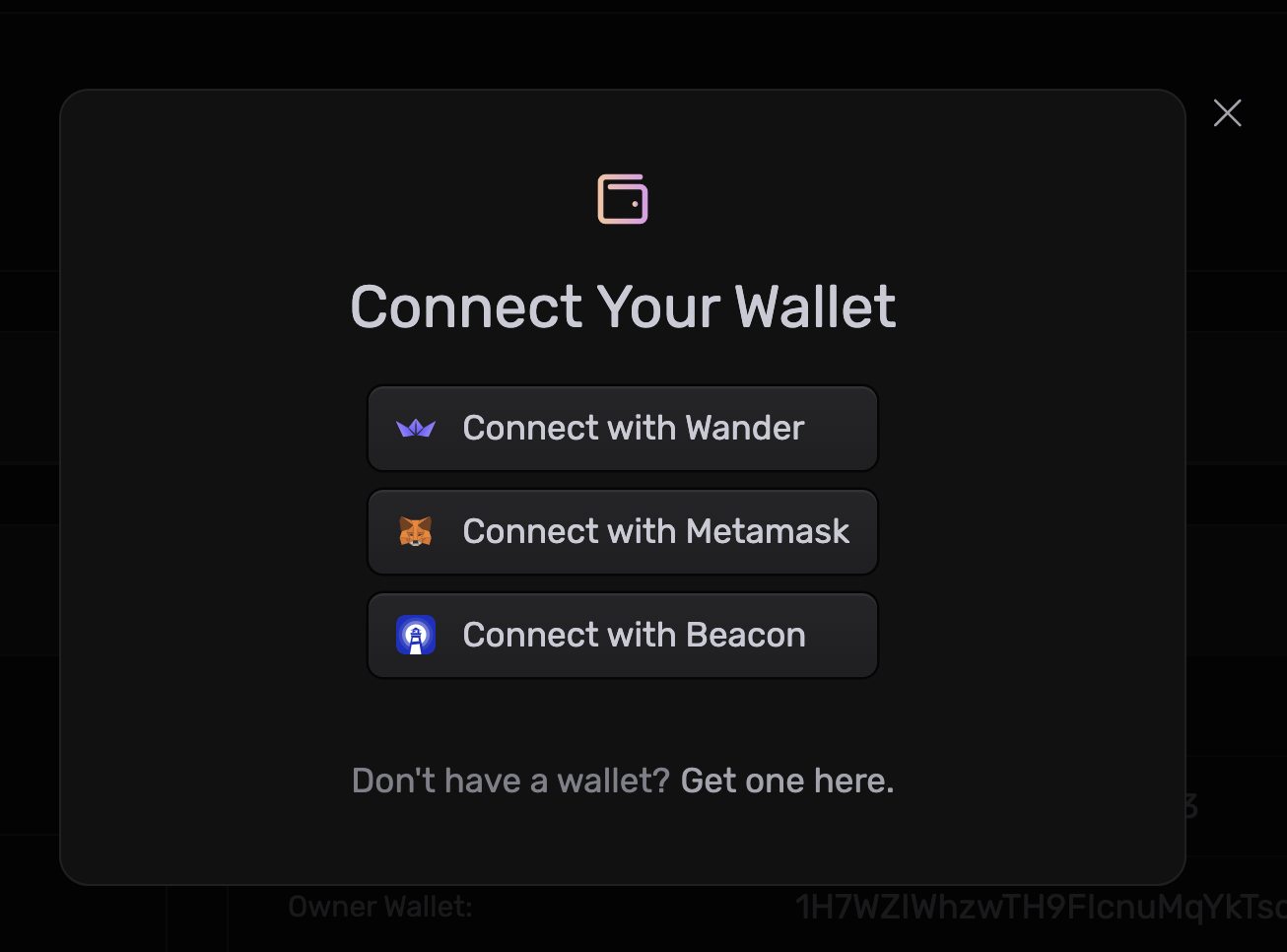
Choose your preferred Solana wallet (Phantom, Solflare, or Backpack) to connect.
Wallet Address Requirement
Use the same wallet address that you configured in your gateway's AR_IO_WALLET environment variable. This wallet will be the owner of your gateway registration.
Fill Out Gateway Information
Complete the gateway registration form with your gateway details:
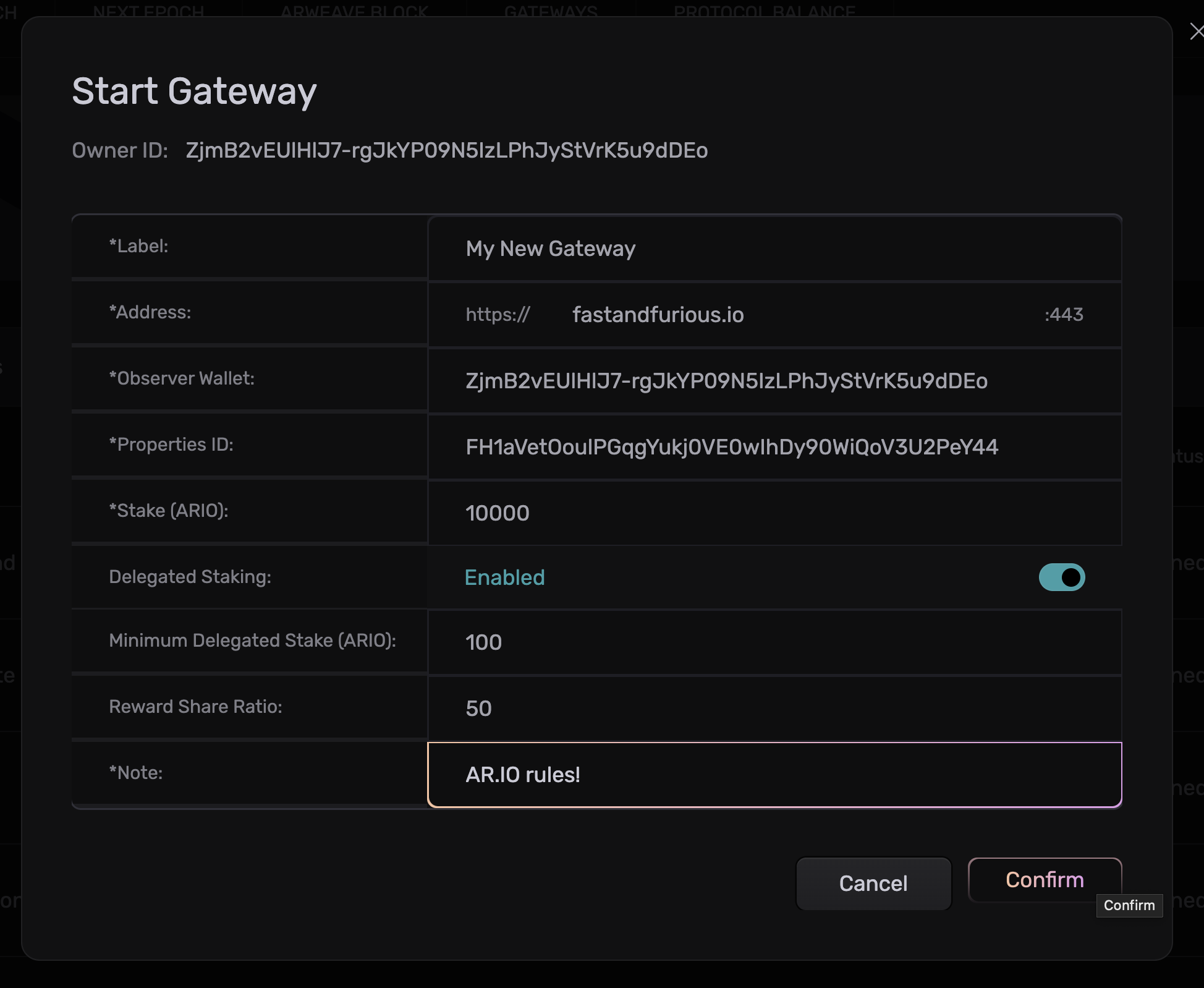
Required Fields:
- Label: A display name for your gateway (e.g., "My New Gateway")
- Address: Your gateway's domain with port (e.g.,
https://fastandfurious.io:443) - Observer Wallet: The public address of your observer wallet
- Properties ID: Transaction ID of your gateway properties
- Stake (ARIO): Minimum stake required (20,000 ARIO)
- Delegated Staking: Enable to allow others to delegate stake to your gateway
- Minimum Delegated Stake: Set minimum delegation amount (e.g., 100 ARIO)
- Reward Share Ratio: Percentage of rewards shared with delegators (e.g., 50%)
- Note: Additional information about your gateway (e.g., "ar.io rules!")
Confirm Registration
Review all information carefully and click "Confirm" to submit your gateway registration to the network.
What happens next:
- Your gateway will be added to the Gateway Address Registry
- Observers will start observing your gateway at the next Epoch (day)
- You will begin to receive rewards based on your gateway performance
- You can monitor your gateway's performance in the portal
Confirm your gateway registration:
Your gateway should now be viewable at gateways.ar.io/#/<ar-io-wallet-address> with the wallet address you used to join.
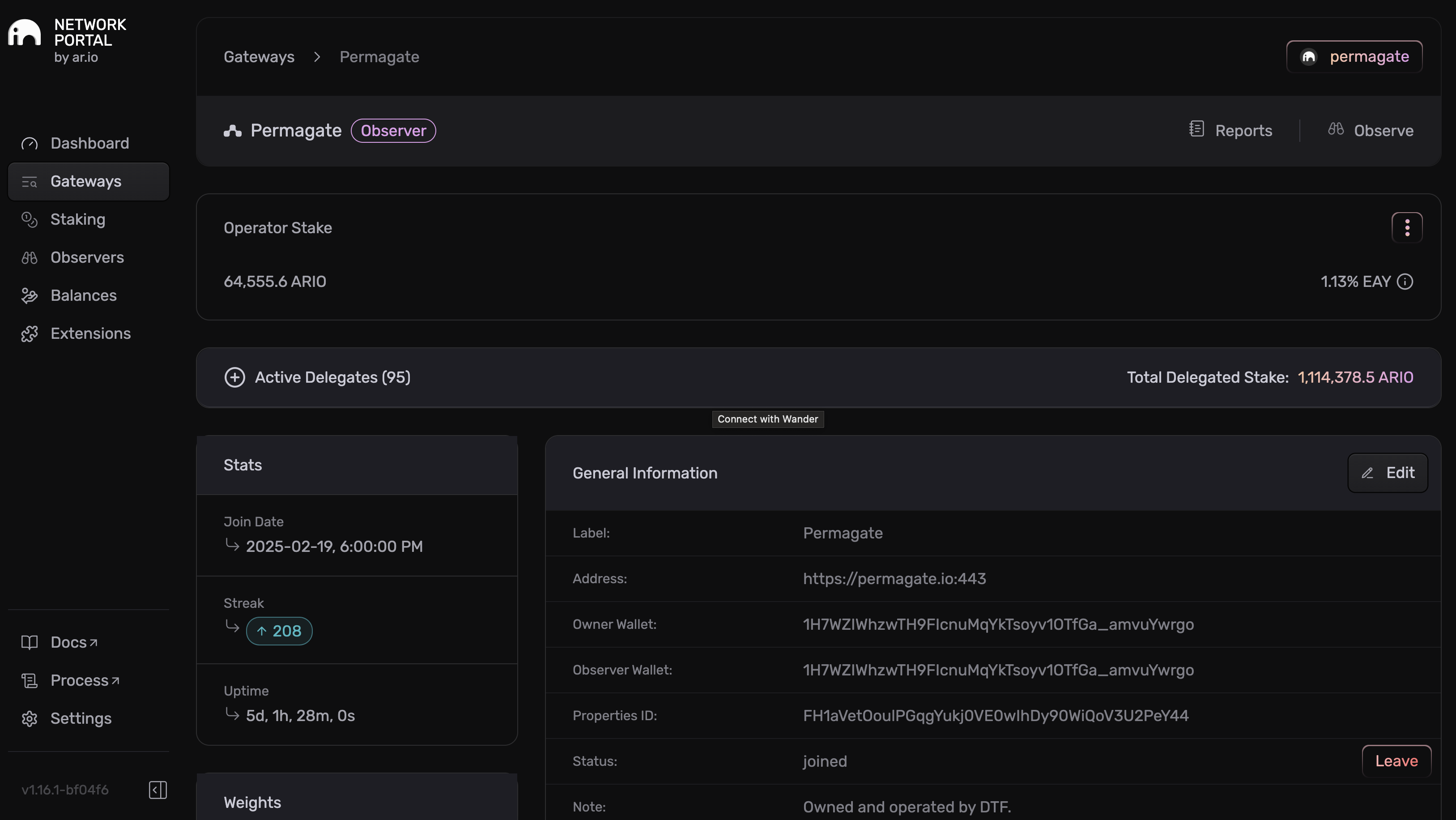
This dashboard shows your gateway's information, stats, and performance metrics including join date, uptime, operator stake, and delegated stake details.
Install the ar.io CLI
First, install the ar.io CLI tool if you haven't already:
npm install -g @ar.io/sdkRun the Join Network Command
Use the ar.io join-network command with your gateway configuration. The operator key can be supplied either as a JSON keypair file (--wallet-file) or as a base58-encoded 64-byte secret key string (--private-key). The latter is the format Phantom and similar browser wallets export, so most operators can paste it directly.
ar.io join-network \
  --wallet-file ./path/to/solana-keypair.json \
  -t solana \
  --mainnet \
  --rpc-url https://api.mainnet-beta.solana.com \
  --core-program-id 73YoECm6NKXpVRoe5f1Q9BcP5DJGPFUjnFy6AxBE5Nvh \
  --gar-program-id 89fNiiwgpFSPHKuqfNUkgYTYjtAJAhyqHjXmgXeppGpf \
  --arns-program-id 2yCUx5edFvUrkibYaUa2ZXWyx9kuJkS8CwyzsgHPWdZZ \
  --ant-program-id 2MWexMHfMhGJwMHv9Qm9YAVCqjUFUJwDJAysW4oCUGk5 \
  --operator-stake 20000 \
  --auto-stake \
  --allow-delegated-staking \
  --min-delegated-stake 100000000 \
  --delegate-reward-share-ratio 10 \
  --label "My Gateway" \
  --note "Production ar.io gateway" \
  --observer-address 7xKXtR2qpZm8FjvKNsG3kL9p5yMnYhVdEbxQ4oWc2Rn \
  --fqdn my-gateway.example.com \
  --port 443 \
  --protocol https
Phantom-export base58 key
To use a Phantom-exported secret key directly, replace --wallet-file ./path/to/solana-keypair.json with --private-key '<base58-string>'. The SDK decodes the 64-byte secret, derives the public key, and signs in-memory — no JSON file required.
Operator vs Observer Identity
The public key derived from your --wallet-file / --private-key becomes your AR_IO_WALLET (operator). The --observer-address must be a unique Solana address; no two gateways can share an observer. If you don't have a separate observer key, set --observer-address to your operator address. The gateway accepts this single-key setup.
Parameter explanations:
--operator-stake 20000— operator stake in whole ARIO units (CLI converts to mARIO internally). Minimum is 20,000 ARIO on mainnet.--auto-stake— flag-only (no value). When set, operator rewards auto-restake to your gateway.--allow-delegated-staking— flag-only. Permits other wallets to delegate stake to you.--min-delegated-stake 100000000— minimum delegation in mARIO (100 ARIO × 1,000,000). Unlike--operator-stake, this argument is in mARIO directly.--delegate-reward-share-ratio 10— percentage of rewards shared with delegators (0-100).--observer-address— Solana address of the observer key (often the same as the operator address).--fqdn— your gateway's public domain name.-t solana— required to switch the CLI into Solana mode (default is Arweave).--mainnet— selects Solana mainnet behavior. The explicit--core-program-id,--gar-program-id,--arns-program-id,--ant-program-id, and--rpc-urlflags pin the command to the canonical mainnet deployment.
Verify Registration
Verify the on-chain registration via the CLI:
ar.io get-gateway \
  --mainnet \
  -t solana \
  --rpc-url https://api.mainnet-beta.solana.com \
  --core-program-id 73YoECm6NKXpVRoe5f1Q9BcP5DJGPFUjnFy6AxBE5Nvh \
  --gar-program-id 89fNiiwgpFSPHKuqfNUkgYTYjtAJAhyqHjXmgXeppGpf \
  --arns-program-id 2yCUx5edFvUrkibYaUa2ZXWyx9kuJkS8CwyzsgHPWdZZ \
  --ant-program-id 2MWexMHfMhGJwMHv9Qm9YAVCqjUFUJwDJAysW4oCUGk5 \
  --address <your-operator-pubkey>
The result should show "status": "joined" and the settings (FQDN, stake, allow-delegated, etc.) you passed at join time.
Once your gateway is running and pointed at the same network, cross-check from the gateway side too:
curl https://<your-gateway>/ar-io/info | jq '{wallet, programIds}'walletshould match the operator pubkey you joined with.programIds.{core,gar,arns,ant}should match the network you joined (mainnet program IDs, or whichever staging/devnet set you're using).
If those don't line up, your gateway is querying a different network than the one you joined. That's the usual reason a freshly-joined gateway doesn't show up as observing.
You can also verify in the portal: gateways.ar.io/#/<your-operator-pubkey>.
What Happens After Registration
After joining the network:
- Your gateway will be monitored by the Observer system
- You'll earn rewards for providing reliable service
- You can monitor your gateway's performance and earnings in the portal
- You may be selected as an Observer to help monitor other gateways
Next Steps
Your gateway is now part of ar.io! Here are some next steps to maximize your participation:
Delegate to Gateways
Participate in the network by delegating your stake to other gateways and earn rewards
Start Indexing Data
Configure your gateway to index specific data types and optimize performance for your use case
Use Wayfinder SDK
Fetch data from your gateway and the network using the Wayfinder SDK for optimal routing
Join the Community
Connect with other gateway operators and get support from the ar.io community
How is this guide?